
Overview
Every task in Action Center has a corresponding action that needs to be done, for example, Set usage policy or Revoke tokens. UpGuard’s Risk Automations allows these actions to run themselves, instead of sending you to your directory to do the work by hand.
Workflows by task type
Risk Automations includes a template for each task type that needs work done outside UpGuard:
- Reset passwords uses the Reset exposed credentials template. It needs an UpGuard API credential and an admin credential for your directory, Microsoft Entra ID or Google Workspace, plus a credential for the channel that messages the affected people.
- Review identity breach uses the Notify users about breach template, which sends the drafted message to the people in the breach.
- Revoke tokens uses one of two templates, depending on your directory: Revoke Microsoft Entra OAuth Tokens for Users, or Revoke Google Workspace OAuth Tokens for Users.
To create a workflow, go to Risk Automations > Templates, select the template and click Use template. Where a workflow exists, the task’s button carries a lightning icon; where one doesn’t, the same button opens the manual steps instead.
What the timeline records
When a Risk Automations workflow is run on an Action Center task, each step of the process is recorded on the timeline.
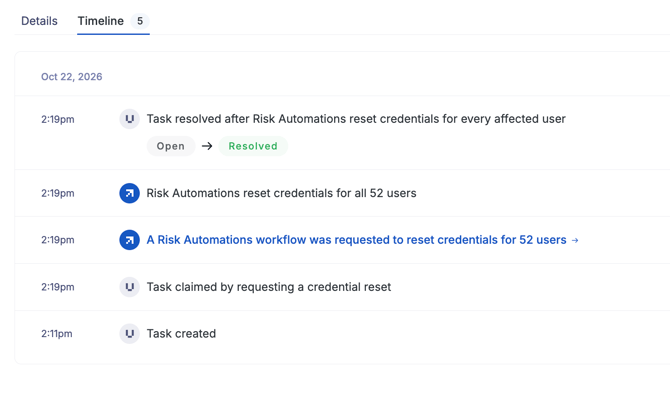
A successful run resolves the task on the spot. The task will show as Resolved by UpGuard rather than the admin who started it, so the record distinguishes work the automation did from work a person did.
Access
Running a task's action through a workflow needs the same read/write User Risk permission as doing the work by hand. See Action Center: Access and Permissions.