- Overview
- The posture summary
- Top insights
- Filter your risks to an insight
- Good to know
- Help us improve
Overview
Attack Surface Posture is a plain-language read of the current exposure on your internet-facing estate and the main factors driving it. It sits at the top of your Risk Profile (Breach Risk > Risk Profile), so you get the headline before you work through individual risks.
To work through Attack Surface Posture:
- Read the summary for your headline posture.
- Expand the top insight to understand what's driving it.
- Enable Filter risks to see the related risks in your Risk Profile.
- Work through those risks — remediate them, or waive them if you have appropriate controls in place.
- Share the recommended action with whoever owns that capability, then move down the list and repeat.
Attack Surface Posture is produced by the UpGuard Security Advisor, the same advisor behind Threat Posture.
While your Risk Profile lists each risk found on your domains and IP addresses, the Security Advisor works one level up; it looks across those risks, groups them by what an attacker could do with them using the MITRE ATT&CK framework, and explains what that means for your business.
Attack Surface Posture refreshes weekly, not every time a scan runs. The panel is dated so you can see how current it is — for example, Attack Surface Posture: 19 October.
❗ Attack Surface Posture and its recommended actions are AI-generated — treat the recommended actions as guidance to inform your response, not a substitute for your own judgment.
The posture summary
At the top of the panel is a short summary of your overall posture — the headline level and the main factors behind it, written in everyday language. Read it first for a quick sense of where you stand before you dig into the detail.

Top insights
Below the summary are the Top insights — the most important exposures the Security Advisor has found across your risks, most significant first. Each one groups related risks by the exposure they create for your business, such as access to staff and customer accounts, interception of data in transit, or software that no longer receives security fixes. Some insights point out patterns that span several areas, such as the same weakness repeated across many hosts, or a weakness that has been open for a long time.
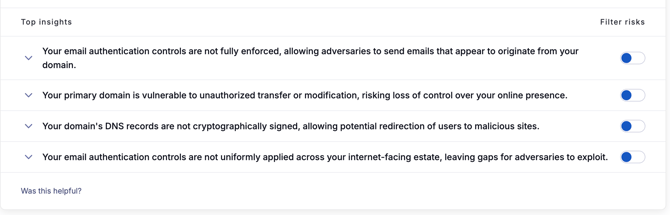
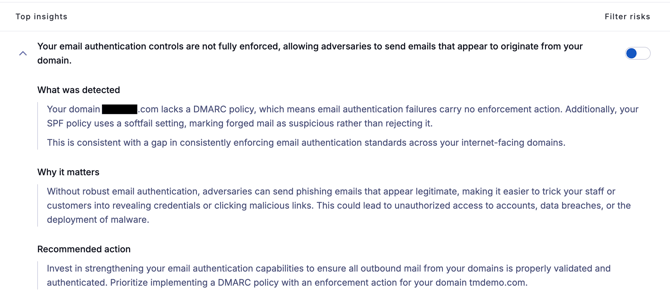
Select any insight to expand it into three parts:
- What was detected — the main risks behind the insight, how many assets they affect, and what the pattern suggests about how your estate is managed.
- Why it matters — what this exposure could mean for your business if it isn't addressed.
- Recommended action — the capability or program that would most reduce this kind of exposure, often with a specific risk to start with.
Filter your risks to an insight
- Click the Breach Risk icon in UpGuard's left-hand navigation panel.
- Click Risk Profile.
- In Top insights, find the insight you want to work on.
- Enable the Filter risks toggle on the right of the insight.
Your Risk Profile now shows only the risks behind that insight.
A chip below the Attack Surface Posture panel names the insight theme you've filtered by — for example, Filter: Account takeover. To clear the filter, disable the toggle or select the ✕ (Clear insight filter) on the chip. You can also combine an insight filter with the standard filters — the category filter and Apply filters (portfolio, label, finding, and severity).
🎵 Filtering by an insight only changes what you're looking at. It doesn't remediate, waive, or alter any risks.
Good to know
-
It focuses on exposure. Insights describe what's at risk, not what's working, so checks your estate passes aren't listed.
-
Accepted risks still count. An accepted risk can still appear in an insight, because accepting a risk is a decision not to act; the exposure remains.
-
Not every risk appears. Insights cover the risks that matter most to your overall posture. A risk or area that isn't mentioned hasn't necessarily been cleared; your Risk Profile has the full list.
-
Changes show after the next refresh. A risk you fixed today may still appear until the weekly refresh.
-
Sometimes there isn't enough to say yet. If there are too few risks to form meaningful insights, the panel says so instead of showing insights.
Help us improve
Under the insights, you'll find a Was this helpful? thumbs up / thumbs down. Your feedback helps us tune the analysis, so let us know if an insight was useful or missed the mark.