
What is the Action Center?
Action Center is the starting point for User Risk. It displays the risks detected by User Risk, along with what you should do about them, as a prioritised list of tasks.
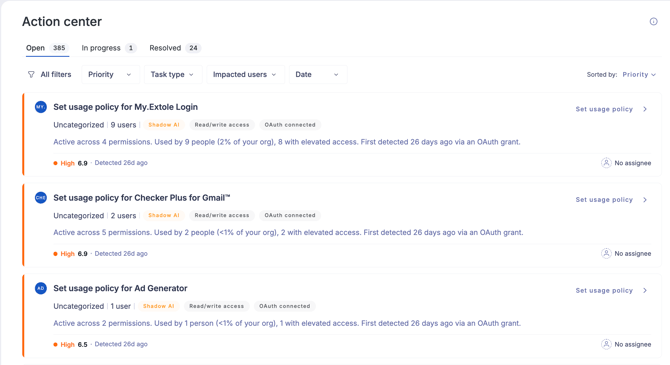
How it works:
- User Risk detects risk. Each daily scan looks at your directory data, your workforce's app usage, and newly disclosed identity breaches.
- Action Center creates tasks. Each task is one action that needs to be taken, e.g. set a policy for this app, revoke these tokens, reset these credentials.
- You work through the feed. Tasks are ranked so the most consequential decision sits at the top. Act on a task yourself, or assign it to someone who can.
- Tasks can resolve themselves with Risk Automations. If you have a Risk Automations workflow set up for that task type, the task can action and resolve itself – for example, resetting the passwords or revoking the tokens for you. If you don’t have Risk Automations set up, the task shows you the steps to carry it out in your directory.
- Tasks move as you work them. A task stays Open until someone picks it up. Assign it to a colleague from the Assigned to field, or take it yourself with Actions > Move to in progress.
- Resolving a task can create a follow-up. For example, blocking an app doesn’t invalidate the OAuth tokens people already granted it, so revoking those tokens would become its own linked task.
- Everything is recorded. Each task keeps a timeline of what changed, when, and who did it.
What is a task?
A task describes an action that needs to be taken, based on the risk that was identified. For example, "Set usage policy for Cursor".
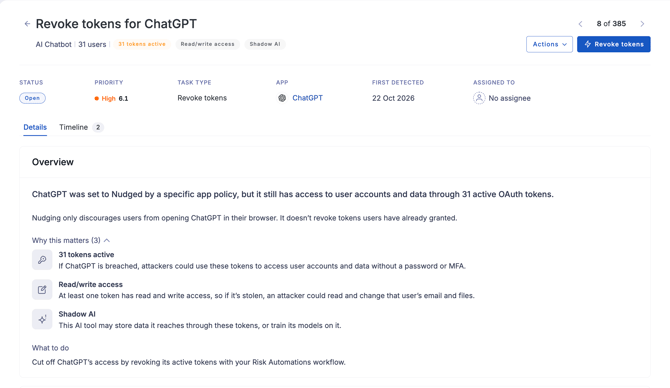
Each task contains:
- A title naming the action and the app, breach or users it concerns.
- The category and the number of people affected, e.g. "AI code editor · 4 users".
- Risk signals, e.g. short tags such as Shadow AI, Read/write access or Passwords exposed that explain why the task ranks where it does.
- A description of what is happening and since when.
- A priority band and rating from 0.0 to 10.0.
- The assignee, or No assignee if nobody has claimed it.
Assign a task to a colleague
Action Center is one shared feed rather than a queue for each person, so work is divided by assigning tasks. Assign one to a colleague with read/write User Risk permission — a read-only user can open a task and read its timeline, but can’t act on it.
- To assign a task, open it, click the Assigned to field and pick a colleague. The task moves to the In progress tab.
- The assignee has the same actions you did. Assigning changes who owns a task, not how it gets resolved.
- The In progress tab shows every admin’s tasks, not only yours, and can be filtered by assignee.
- Credit follows whoever resolved the task, not whoever it was assigned to. The timeline records who did the work.
Task history and notes
Every task keeps a timeline of what happened to it: when it was created, who claimed it, who resolved it, and anything it spawned. The timeline is append-only, so entries can’t be edited or removed once they are added.
- Resolved by credits whoever closed the task. Where a Risk Automations workflow did the work, it shows UpGuard rather than a person.
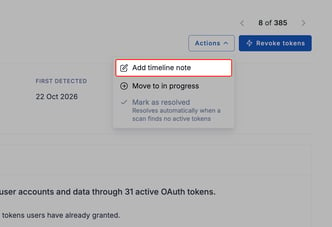
- You can add your own note to any task. Click Actions > Add timeline note to record something the task can’t work out for itself — why you waived something, who you spoke to, or a ticket number in another system. The note is for your own record.
- A task closed by a decision stays closed. If the nature of the risk changes later, Action Center will create a new task rather than reviving the old one. However, a task that resolved on its own — because the app was uninstalled, or its tokens were revoked independently — can reopen if the same risk recurs.
Learn more
- Action Center: Task types: What creates each kind of task, and how each one closes.
- Action Center: Risk Automations: When a task's action runs itself instead of sending you to your directory.
- Action Center: Task priority: How the 0.0 to 10.0 rating and the priority bands work.
- Action Center: Access and permissions: Who can see Action Center, and who can act on a task.