
- Overview
- Monitoring slots
- Change limit
- What counts as a change
- When you're close to your change limit
- When you reach your change limit
Overview
There are two key limits you need to be aware of when monitoring vendors:
- your monitoring slots
- your change limit
Monitoring slots
Your monitoring slots is how many vendors you can monitor at the same time. Each monitored vendor uses one slot. On paid plans, your Order Form states how many slots you have.
When all your slots are in use, you can't monitor another vendor until you stop monitoring one or buy more slots. You can also add vendors without monitoring them. These non-monitored vendors appear on the Not monitored tab of the Vendors page and don't use a monitoring slot. See Vendor Risk: Non-Monitored Vendors.
Change limit
Your change limit describes how many changes you’re allowed to make to your Monitored list.
In any rolling 12 months, you can monitor up to twice as many different vendors as you have monitoring slots. For example, with 50 monitoring slots you can monitor up to 100 different vendors in any 12-month period. This allowance covers short-term assessments of vendors you’re considering, and the normal turnover of vendors you take on and stop using over 12 months.
The limit counts different vendors, not how many times you turn monitoring on and off.
|
With 50 monitoring slots (this is just an example) |
|
|
Vendors monitored at the same time |
Up to 50 |
|
Different vendors monitored in any 12 months |
Up to 100 |
|
Turning monitoring on and off for the same vendors |
No limit, as long as you stay within your monitoring slots |
🎵 The change limit applies to free and paid Vendor Risk plans, for new and existing accounts. This limit was introduced in November 2026; changes made before then don't count toward your limit.
What counts as a change
A change is used when monitoring a vendor you haven't monitored in the last 12 months.
Uses a change:
- Monitoring a vendor for the first time
- Monitoring a vendor you last monitored more than 12 months ago
Doesn't use a change:
- Monitoring a vendor again within 12 months of when you last monitored it
- Stopping monitoring
- Adding a new vendor to your Not monitored tab.
A vendor counts toward your limit for 12 months after you last monitored it. Deleting a vendor doesn't remove it from the count.
When you're close to your change limit
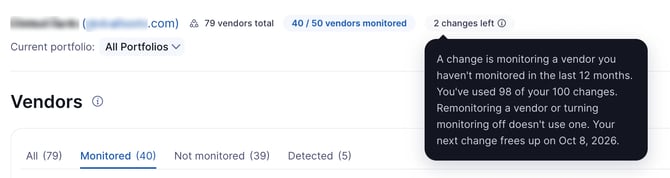
When you're close to your change limit, a “changes left” indicator will appear. Hover over the indicator to see how many changes you've used and when your next change frees up.
When you reach your change limit
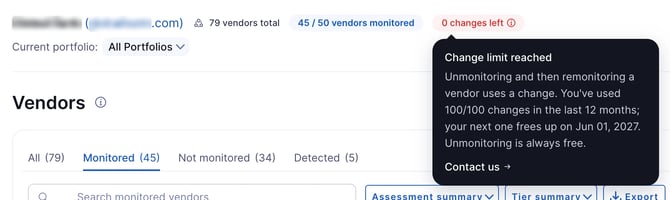
When you have no changes left, the indicator will show 0 changes left. You won’t be able to start monitoring new vendors, even if you have monitoring slots free, until your next change frees up.
However, you can still:
- Monitor any vendor you've monitored in the last 12 months, as long as you have a monitoring slot free
- Stop monitoring vendors
- Add new vendors to your Not monitored tab
Changes free up as vendors pass 12 months since they were last monitored.
To get more changes:
- Paid plans: click Contact us in the indicator. UpGuard Support reviews each request and can raise your limit where there's a valid reason.
- Free plans: buy more monitoring slots or upgrade your plan. The limit on free plans can't be raised otherwise.
Your change limit is twice your monitoring slots, so buying more slots also raises your change limit.
🎵 Adding a vendor without monitoring it doesn't use a monitoring slot or a change. See Vendor Risk: Non-Monitored Vendors.