
❗ As of November 2026, vendor snapshots are being transitioned to a new workflow and are no longer available to buy. If your account has vendor snapshots, you can keep using them under your current contract terms. We've left this page up for accounts that still use snapshots, and will take it down at a later date.
To evaluate a vendor, monitor it while you assess it, then move it to your Not monitored tab when you’re done. To learn more, see Vendor Risk: Non-Monitored Vendors.
Monitoring vendors in UpGuard allows you to continuously monitor an organization, see changes in their security rating over time, and perform risk management activities like performing risk assessments, sending security questionnaires and requesting remediation.
Vendor snapshots
A vendor snapshot allows you to view the external risks of a particular vendor for 30 days. The most common use case is to help with the due diligence process when assessing or comparing potential vendors.
To view your vendor snapshots, navigate to Vendor Risk >Vendors and then select the Snapshots tab.
🎵 The Snapshots tab only appears if your account still has vendor snapshots.
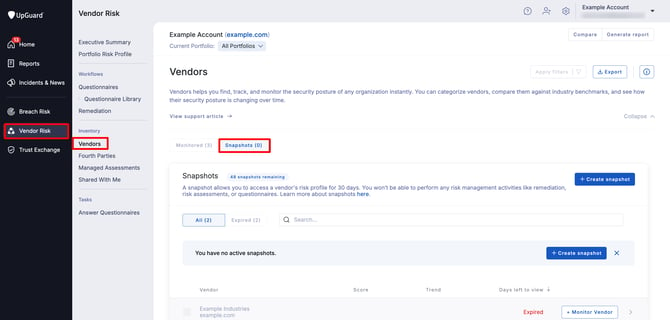
Similar to monitoring a vendor, a snapshot allows you to view security rating details on the vendor summary page and also generate a summary or detailed report.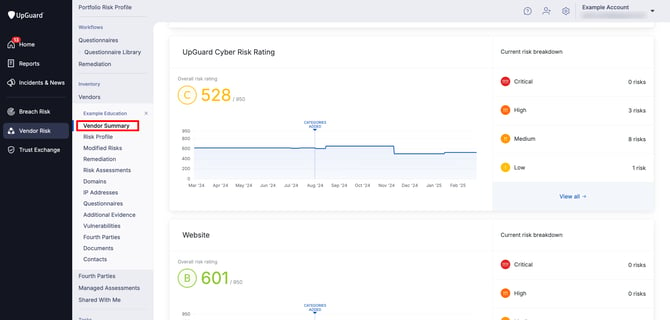
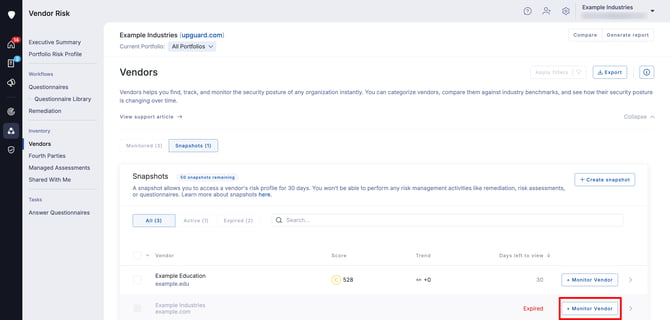
You can also see a list of your expired snapshots so you can keep track of organizations you have viewed before. If you decide to engage that vendor and want to monitor them continuously, you can upgrade a snapshot vendor (active or expired) to a monitored vendor at any time by selecting Monitor Vendor from the list or detailed view.
Monitored vendor
When you monitor a vendor, UpGuard will continuously monitor the organization and you'll be able to see changes in their security rating over time, as they occur.
To view your monitored vendors, navigate to Vendor Risk > Vendors and look at the Monitored tab.
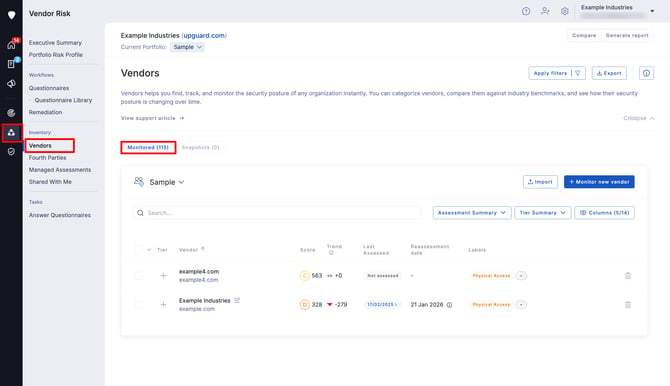
When you monitor a vendor, you'll be able to continuously monitor the organization and:
- Perform risk assessments
-
Request remediation of any identified risks
-
Send security questionnaires
- Receive notifications about changes in security rating, vendor domains, and vendor risks.
Learn how to add a new vendor to your monitored vendor list.