
- Overview
- What is the overall security rating?
- What is the Security Profile Rating?
- Detailed comparison
- Which rating to use
Overview
A vendor in Vendor Risk can have two ratings, each built for a different job:
- Overall security rating combines automated scanning with the vendor's active security questionnaires to give a summary of how well the vendor keeps its systems safe, inside and out. Use it for a broad view of the vendor's security over time.
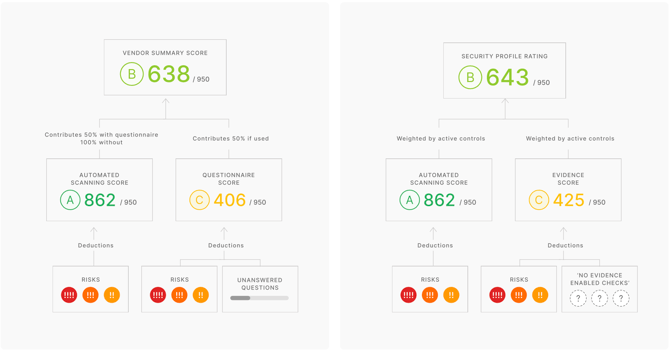
- Security Profile Rating is the rating on a Security Profile risk assessment. UpGuard's AI reads the evidence you've added and checks it against the control template you picked. It then combines those results with the vendor's scan results. The rating shows how well the vendor meets the security needs you care about.
Both ratings use the same 0-950 scale and A-F letter grades (learn more at How are UpGuard's security ratings calculated?). However, because they're calculated differently, the two ratings won't always match.
What is the overall security rating?
The overall security rating is the vendor's main rating in Vendor Risk. It's labelled Overall security rating in the Vendors list and the vendor's company profile, and Overall risk rating at the top of Vendor Summary. It's also the rating used in the Vendor Risk Executive Summary and in reports.
🎵 On Vendor Summary, the category and questionnaire cards also use the label Overall risk rating, for their own scores. The vendor's overall security rating is the one at the top.
The rating combines findings from automated scanning and security questionnaires:
- When you first monitor a vendor, the rating is based only on automated scanning.
- Sending a security questionnaire adds questions and controls that automated scanning doesn't cover. Once the vendor submits their responses, the findings count toward the rating.
Weighting
Until the vendor submits a questionnaire, the rating is 100% automated scanning. After that, automated scanning makes up 50% of the rating and the questionnaire rating makes up the other 50%. Vendor Summary then shows the Automated scan rating and Questionnaire rating under the overall rating. For example, a vendor with an automated scan rating of 352 and a questionnaire rating of 129 has an overall risk rating of about 240.
What lowers the rating
Risks (and their severity) found by automated scanning or in active questionnaires, and unanswered questionnaire questions. Risks found in Additional Evidence don't count toward this rating.
What raises the rating
Answering questions, remediating risks, or manually adjusting a risk's severity.
The automated scan rating is explained in How are UpGuard's security ratings calculated? Questionnaire ratings are explained in Why is my vendor's questionnaire score so low?
What is the Security Profile Rating?
The Security Profile Rating is the rating on a risk assessment you generate from Security Profile. It's calculated from the controls and checks in the vendor's control template, except any marked N/A. UpGuard's automated scanning assesses some of those checks. Evidence assesses the rest, such as documents you upload or answers to a gap questionnaire. On the Domains and IPs tab, you choose which domains and IPs to include in the assessment.
The rating has two parts: an automated scan rating and an evidence rating. In a published risk assessment's Assessment summary, the rating is shown as Security rating, with the Automated scan rating and Evidence rating beneath it. A note under the ratings shows when waived risks have affected them.
Weighting. Each part is weighted by its share of active checks. For example, if 70 of 100 active checks are scanning checks and 30 are evidence checks, automated scanning makes up 70% of the rating and evidence makes up 30%.
What lowers the rating. Missing evidence for in-scope controls and checks, and risks (and their severity) found by in-scope automated scanning or evidence analysis.
What raises the rating. Adding supporting evidence, passing checks, or remediating risks; manually adjusting a risk's severity down; or taking controls and checks out of scope by marking them N/A. See Vendor Risk: Work with Controls and Checks.
Because the control template sets the scope, the template you apply and the evidence you add both have a big effect on the rating. A vendor can score highly against a less strict template and much lower against a stricter one. Adding or removing evidence can also change the rating, because the evidence determines whether and how risks are detected on individual checks.
Detailed comparison
|
Overall security rating |
Security Profile Rating |
|
|
UI label |
Overall security rating (Vendors list, company profile) Overall risk rating (top of Vendor Summary) |
Security rating (risk assessment's Assessment summary) |
|
Basis of rating |
All active security questionnaires and scanning activity. |
A scope-based assessment, based on in-scope controls, checks, and evidence. |
|
Made up of |
Automated scan rating and questionnaire rating. |
Automated scan rating and evidence rating. |
|
Rating range |
0–950, for the overall rating and each part. |
0–950, for the overall rating and each part. |
|
Weighting |
Automated scanning: 100%, or 50% once a questionnaire is submitted. Questionnaires: 50% once submitted. |
Proportional to the number of active scanning and evidence checks. Controls and checks marked N/A don't count. |
|
Affected by |
All scanning results, questionnaire responses, and risk management activity outside Security Profile. |
Results of in-scope controls, checks, domains and IPs, and risk management activity inside Security Profile. |
|
Deductions from |
Risks (and their severity) from automated scanning and active questionnaires. Unanswered questionnaire questions. Risks from Additional Evidence don't count. |
Missing information for in-scope controls and checks. Risks (and their severity) from in-scope automated scanning and evidence analysis. |
|
Where it appears |
Across Vendor Risk, including the Executive Summary and reports. |
Only in Security Profile risk assessments. |
|
Reporting |
Available in all Vendor Risk reports. |
Only in the Security Profile Risk Assessment Report. |
Which rating to use
Use the Security Profile Rating when you're assessing a vendor's risk within a specific risk assessment scope. For example, you might check a new cloud vendor against the ISO 27001:2022 control template before you sign.
Use the overall security rating for a broader view of the vendor's security that includes all of their questionnaires and scanning activity over time.
🎵 Security Profile is in beta, so its rating is kept separate from the rest of Vendor Risk and its scoring method may change as we refine it. Share feedback with your Customer Success Manager or support@upguard.com.
See also